
Cloudflare connector for Sentinel – Supporting sufficient log sizes in VS Code deployments.

When shipping Cloudflare logs to Sentinel and deploying the Cloudflare function app via VS Code, there is a particular environment variable that is important, but (at the time of writing) is not mentioned in the setup documentation.

The details for this variable can be found by reviewing main.py from the app package, or by performing an ARM template deployment from the Sentinel connector page and comparing. Note: the supplied ARM template deploys a consumption plan function app, which cannot be connected to a vnet, and therefore will not support the use of log analytics private endpoints, or permit network access control lists on the storage container.

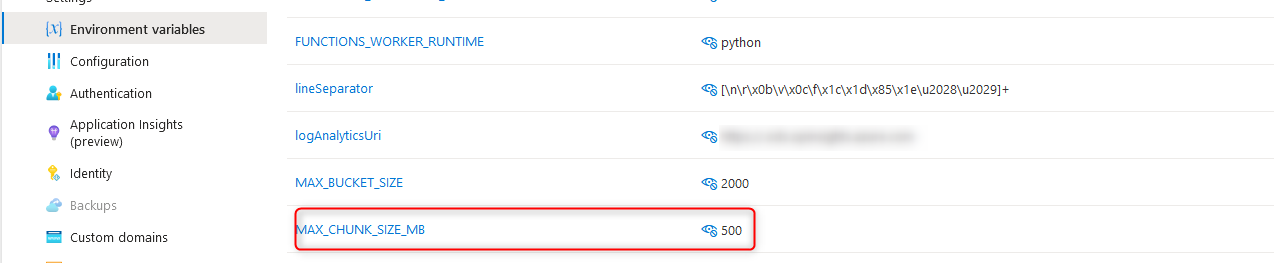
The variable I am talking about is “MAX_CHUNK_SIZE_MB”, which governs the maximum log file size for ingestion. If this value is not defined, it defaults to 1. The following behaviours may be observed if the maximum log size has defaulted to 1MB:

  • Errors in the function app log stream stating “Stream interrupted”.
    This occurs when the default maximum log size is reached. The message may seem to suggest the stream was interrupted from an external condition; however, the function app itself is responsible for terminating this stream.
  • Duplicate events within Sentinel.
    Reviewing the Cloudflare_CL table contents will reveal duplicate events. Duplicate events can be identified by the RayID value. Semi-unique RayIDs are assigned to each Cloudflare transaction, making RayID a useful way to identify duplicate events. If one or more log files are being interrupted during reading, the first portion of the log data will be ingested multiple times, resulting in duplicate log entries.
  • Log files greater than 1MB remaining in the storage account.
    When reading a log file is interrupted, the method to remove the file after completion does not get called. Consequently, the log file remains and is re-read on the next run – resulting in duplicate entries.

Resolving the issue side is achieved by simply creating a new environment variable on the function app called MAX_CHUNK_SIZE_MB and setting the value to a sufficiently large integer (in MB) to cover your log files.
FOSS tooling in self-hosted immutable backups.

I was helping a friend build some immutable backup storage recently, and we put some interesting FOSS tools to use. The results were great. This is not a plug for anything, just my observations.

MinIO: MinIO is an S3-compatible object storage system, with premium tiers available for enterprise users. Some of the key features useful to us were write-time encryption (using KES) for encrypted data at rest, bucket immutability and versioning (important), and simplicity of setup and maintenance. By placing the MinIO host on a dedicated network segment behind an OpenSense firewall, we can expose only the API to a single data ingest host that performs all the front-end work, like a heavy forwarder for backups. This keeps the backup data cozy and safe. The data storage and data ingest hosts can still be hardened to STIG or CIS benchmarks, of course!

Corso Backup: Corso Backup is a 365 backup client, with FOSS and premium editions available. Purely CLI-driven, this lightweight and easy-to-use tool backs up 365 data such as Exchange and SharePoint, with a variety of supported backup destinations (including self-hosted S3-compatible repositories). It has a small footprint on the data ingest host and has many of the nice-to-haves such as deduplication.

Slack Nebula: Nebula is a network overlay product that transmits TLS-encrypted TCP data over UDP, using a “lighthouse” server on the transit network for UDP hole punching to create persistent sessions through NAT gateways. Each client requires its own key and configuration file, and no automatic onboarding tools are provided by Slack (although they use this product for their internal network, and one must assume they have sophisticated tooling internally). However, the manual process is compensated for by how well and reliably it works, and the embedded YAML IP access list within the configuration file. By having pre- and post-backup scripts to establish and drop the Nebula tunnel, remote hosts can be backed up to the immutable S3 bucket via the intermediary ingest host, without requiring site-to-site VPN or any permanent connectivity. Employing well-defined access lists ensures only the minimum necessary surface area is exposed between hosts, for the minimum necessary interval, and not to public or transit networks.

While this isn’t archtiected to suit an organisation the size of HP, it is an excellent implementation for a small or lab environment, plus being fun for my friend and I to build something functional using FOSS tools while keeping in the spirit of least trust and secure by design.

Netbeacon – Success story!

When a friend of mine told me someone had registered a similar domain name to theirs, with a different suffix, and had been sending phishing emails with a forged signature to a variety of unrelated and unknown businesses, I was happy to help. After verifying there was no evidence of email or environment compromise, or internal data being spilled (just the letterhead), I look at the forged domain and emails.

One of the recipients was kind enough to send me a copy of the email, with headers. I was interested to note that the IP of the MUA sending the message was not present – the first MTA was the first IP in the list. So, I looked to the domain.

The registrar, domain privacy provider, and large org hosting the email all ignored my abuse complaints. I made a complaint with Netbeacon, who took the evidence I provided and sent it through the right channels. The domain was de-registered the following day.

Thanks, Netbeacon!