
Building a Sentinel CCF connector for the Action1 patch management platform.

I’ve built a Microsoft Sentinel Codeless Connector Framework (CCF) data connector for Action1, packaged in an ARM template for easy deployment (with LLM help).

RMM and patch-management platforms have privileged access across an organisation’s endpoints. In recent years, high-profile incidents involving RMM platforms have demonstrated how damaging this trusted access can become when compromised.

This makes monitoring suspicious activity in RMM and patch management platforms important.

I noticed the opportunity to do a little personal project: building some Sentinel integrations for Action1. To do this I have used the lovely API the team at Action1 have kindly made available to even the free-tier users (thanks to the Action1 team for that!).

The first stage is the data connector, which ingests Action1 audit events into a custom Log Analytics table, providing a foundation for detections and automated response.

The connector is deployed using a single-deployment Azure ARM template, containing the Custom Table, DCE, DCR including ingestion time parsing, and Sentinel CCF Data Connector template.

The table schema and DCR are defined twice within the template, with the outside declarations being immediately built by Azure, and the inner declarations remaining present for structural compliance with the CCF template structure. The outside declarations are the ones being created, for the time being.

Next update: threat modelling, security use cases, and detections.
Following that: security automations, MCP, and agentic vulnerability/patch management with a focus on self-hosted open-weight models.

Open to all contributions, please raise a PR with improvements if you want to add them:
https://github.com/NathanReevesFSC/A1SentinelCommunitySolution

Cloudflare connector for Sentinel – Supporting sufficient log sizes in VS Code deployments.

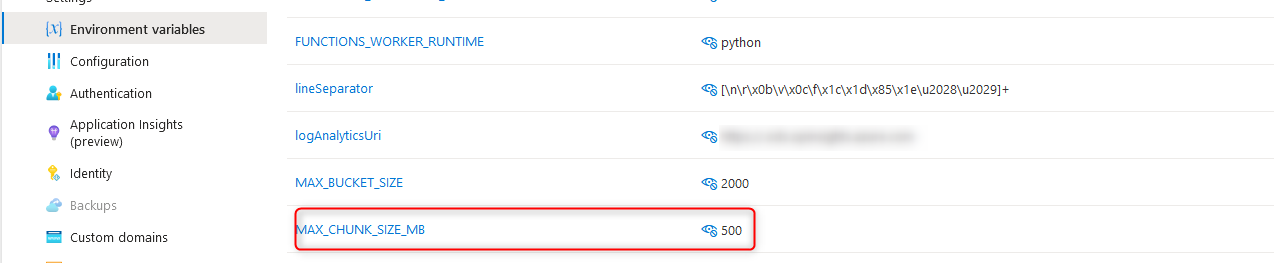
When shipping Cloudflare logs to Sentinel and deploying the Cloudflare function app via VS Code, there is a particular environment variable that is important, but (at the time of writing) is not mentioned in the setup documentation.

The details for this variable can be found by reviewing main.py from the app package, or by performing an ARM template deployment from the Sentinel connector page and comparing. Note: the supplied ARM template deploys a consumption plan function app, which cannot be connected to a vnet, and therefore will not support the use of log analytics private endpoints, or permit network access control lists on the storage container.

The variable I am talking about is “MAX_CHUNK_SIZE_MB”, which governs the maximum log file size for ingestion. If this value is not defined, it defaults to 1. The following behaviours may be observed if the maximum log size has defaulted to 1MB:

  • Errors in the function app log stream stating “Stream interrupted”.
    This occurs when the default maximum log size is reached. The message may seem to suggest the stream was interrupted from an external condition; however, the function app itself is responsible for terminating this stream.
  • Duplicate events within Sentinel.
    Reviewing the Cloudflare_CL table contents will reveal duplicate events. Duplicate events can be identified by the RayID value. Semi-unique RayIDs are assigned to each Cloudflare transaction, making RayID a useful way to identify duplicate events. If one or more log files are being interrupted during reading, the first portion of the log data will be ingested multiple times, resulting in duplicate log entries.
  • Log files greater than 1MB remaining in the storage account.
    When reading a log file is interrupted, the method to remove the file after completion does not get called. Consequently, the log file remains and is re-read on the next run – resulting in duplicate entries.

Resolving the issue side is achieved by simply creating a new environment variable on the function app called MAX_CHUNK_SIZE_MB and setting the value to a sufficiently large integer (in MB) to cover your log files.