I’ve built a Microsoft Sentinel Codeless Connector Framework (CCF) data connector for Action1, packaged in an ARM template for easy deployment (with LLM help).
RMM and patch-management platforms have privileged access across an organisation’s endpoints. In recent years, high-profile incidents involving RMM platforms have demonstrated how damaging this trusted access can become when compromised.
This makes monitoring suspicious activity in RMM and patch management platforms important.
I noticed the opportunity to do a little personal project: building some Sentinel integrations for Action1. To do this I have used the lovely API the team at Action1 have kindly made available to even the free-tier users (thanks to the Action1 team for that!).
The first stage is the data connector, which ingests Action1 audit events into a custom Log Analytics table, providing a foundation for detections and automated response.
The connector is deployed using a single-deployment Azure ARM template, containing the Custom Table, DCE, DCR including ingestion time parsing, and Sentinel CCF Data Connector template.
The table schema and DCR are defined twice within the template, with the outside declarations being immediately built by Azure, and the inner declarations remaining present for structural compliance with the CCF template structure. The outside declarations are the ones being created, for the time being.
Next update: threat modelling, security use cases, and detections. Following that: security automations, MCP, and agentic vulnerability/patch management with a focus on self-hosted open-weight models.
Earlier this year I took an interest in some small-scale tinkering with local, open-weight LLMs.
I started small. Picking up an RTX 3060 12GB was inexpensive, and the small-form-factor card fit perfectly in my Intel NUC 9 Extreme. Twelve gigabytes seemed like a practical amount of VRAM to start with, and the card was easy to pass through over PCIe to a Proxmox guest VM on the NUC.
This was a good place to start, and it remains a useful helper node. It is my intention to run small helper models on this machine: RAG, reranking and visual models to support the Hermes agent. Things like that.
I did move on to building a custom LLM inference machine, though.
There were several compromises made in the name of cost. Computer hardware is expensive. The compromises were all considered and justified, though, and I am happy with the thought that went into them.
The objective wasn’t to build the fastest possible inference server at any cost. It was to get a large amount of usable VRAM, enough system memory, and a sensible number of PCIe lanes without paying workstation-platform prices.
What did I build?
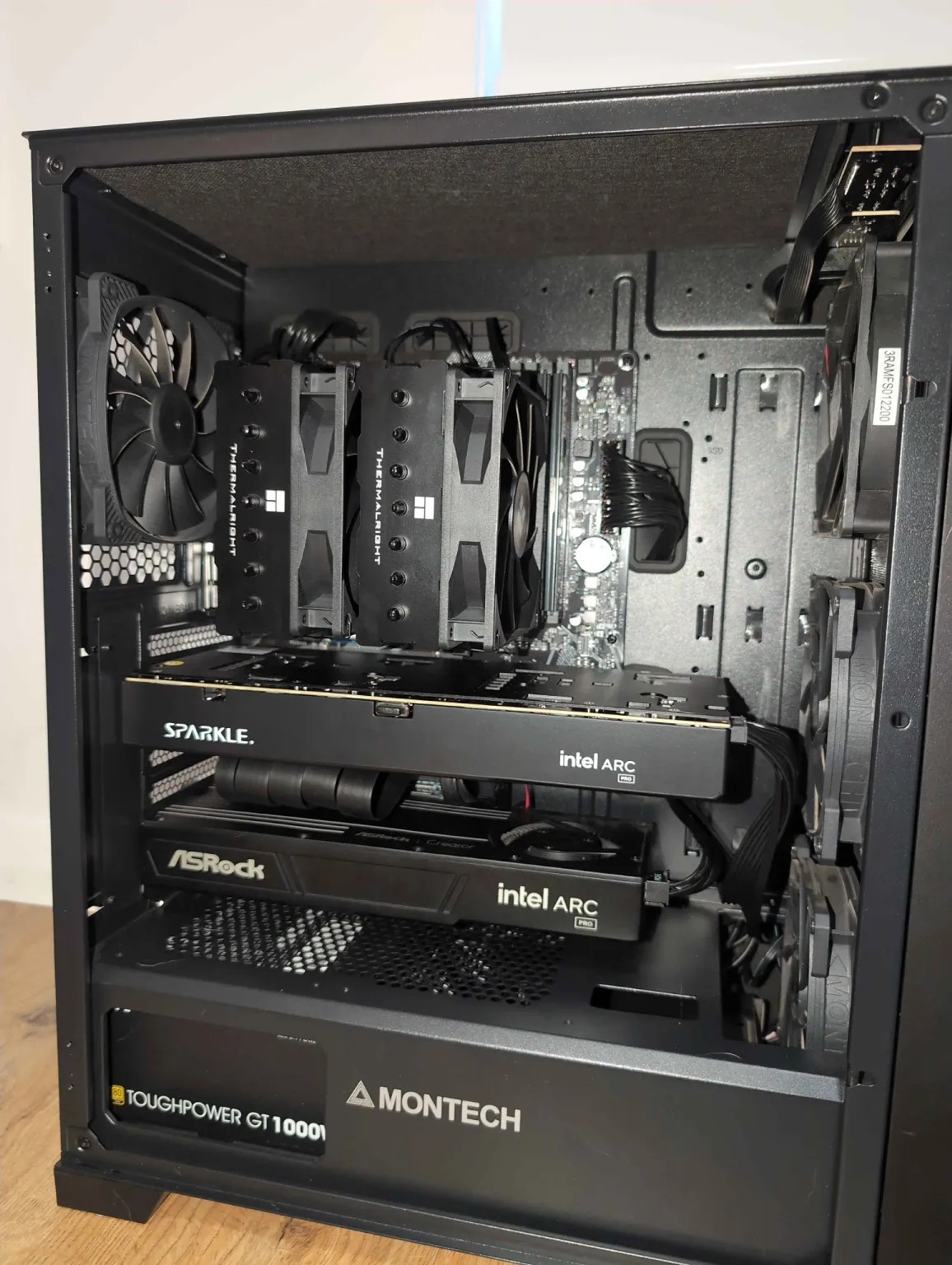
The machine is based around:
Multiple system fans driven through a PWM replicator
A Ryzen 9 5900X
64GB DDR4 RAM
A 1TB NVMe disk
A Gigabyte B550M DS3H AC R2 motherboard
An Intel Arc Pro B60 Dual
A standalone Intel Arc Pro B60
72GB of total GPU VRAM
A 1000W power supply
A Thermalright Phantom Spirit CPU cooler
The CPU and RAM were bought through Facebook Marketplace. The video cards were bought new.
That was deliberate. CPUs and RAM are fairly safe second-hand purchases if they can be tested. GPUs are more expensive, mechanically more complicated, and a much more lucrative target for scammers palming off defective kit. With the video cards being the centre of the build, I was happier buying them new.
Ryzen 9 5900X
I found a Ryzen 9 5900X on Facebook Marketplace at a good price.
This is one of the top CPUs available for the AM4 platform, and I think it was a good investment. It gives me 12 cores and 24 threads without requiring a move to a newer and more expensive motherboard and memory platform.
It is more than capable of looking after the host operating system, containers, model loading and the orchestration around the GPUs. It also gives me some room for CPU offload when needed, although avoiding CPU offload is obviously preferable for inference performance.
The AM4 platform is old enough to be affordable, but not so old that it is a problem. That distinction mattered throughout this build.
64GB RAM
I installed 64GB of DDR4 RAM. I would prefer to have more, but RAM is far too expensive for that at the moment.
The 5900X drives all four RAM slots at 3200MHz without the all-slots-full-slow-down-memory-clock that some CPUs deliver. So that’s winning.
More system memory would allow more model weights to remain cached and make CPU-offloaded models a little easier to manage. However, I would rather spend the available budget on VRAM. For the workloads I am targeting, GPU memory is the scarcer and more immediately useful resource.
Sixty-four gigabytes is enough for the operating system, inference services, model loading and the supporting tools around them. It is a compromise, but a sensible one.
1TB NVMe storage
The machine has a 1TB NVMe disk. This sits in the CPU-connected NVMe slot.
Model files become large very quickly, particularly when testing several quantisations of the same model. One terabyte is not unlimited, but it is enough to keep a practical collection of models locally without spending heavily on storage at the beginning of the build.
Using the CPU-connected slot also keeps the main disk away from the chipset link being used by the third GPU. That matters because the second full-length PCIe slot is already one of the key compromises in the machine.
The B550M motherboard trade-off
The motherboard is a Gigabyte B550M DS3H AC R2.
It has one PCIe Gen 4 slot with 16 lanes connected directly to the CPU. The second full-length slot is PCIe Gen 3 x4 and connected through the chipset.
Seems a bit old, no?
It is; but this is one of the key trade-offs I made.
A workstation platform with more direct CPU lanes would be cleaner. It would also be much more expensive once the motherboard, CPU and memory were included. I didn’t need every GPU to have a full x16 connection. I needed a lane arrangement that could accommodate three GPUs without ruining the economics of the build.
The primary slot supports x8/x8 bifurcation. That means the 16 CPU-connected lanes can be split into two eight-lane links. This allows me to run the Intel Arc Pro B60 Dual, which is effectively two Arc Pro B60 GPUs on one board. Each GPU receives eight PCIe lanes and provides 24GB of VRAM.
The second slot accommodates a standalone B60. It is limited to PCIe Gen 3 x4 through the chipset, but that does not make it useless.
Far from it.
Why PCIe Gen 3 x4 is enough here
The standalone B60 does not have the bandwidth needed to make tensor parallelism attractive. Tensor parallelism requires the cards to exchange data frequently while jointly processing the same layers. Fast communication between GPUs matters a lot in that situation.
That isn’t the only way to use multiple GPUs, though.
With pipeline parallelism, the model can be divided into groups of layers and placed across the GPUs. The activations passed from one stage to the next are tiny compared with the bandwidth available from even a PCIe Gen 3 x4 interface. Loading the model onto the card will be slower, but once it is resident in VRAM, the link is still useful.
This layout is indeed useful for running 70B models of 50GB+ sized weights entirely in VRAM. There is some overhead involved in orchestrating the sharded weights and moving tokens between cards – but it does work quite acceptably.
For multi-agent workloads, or offline-batched workloads, all three cards are expected to be utilised at a given time. This maximises the use of resources and achievable performance.
The chipset slot is a compromise. It is also the slot that lets an inexpensive consumer motherboard host the third accelerator. I am happy with that exchange.
Three Intel Arc Pro B60 GPUs: 72GB VRAM
The GPU configuration consists of an Intel Arc Pro B60 Dual and a standalone Intel Arc Pro B60.
The Dual card contains two B60 GPUs, each with 24GB of VRAM. The standalone card adds another 24GB. That gives the machine three Arc Pro B60 GPUs and 72GB of total VRAM.
That’s plenty for quantised 27B to 70B models with loads of context.
The cards were attractive because they offer a large amount of new VRAM at a much lower price than traditional datacentre accelerators. They are not a perfect replacement for NVIDIA hardware. Software support and backend maturity still matter, and the build uses Vulkan-based inference rather than relying on CUDA.
But 72GB creates options.
A model that fits on a single card can run there without being split. A larger model can be distributed across the cards. Separate agents can be given their own models and GPU affinity. Helper models can be kept apart from the primary reasoning model. The system can favour interactive speed for one job and capacity for another.
My testing has already shown that more cards do not automatically mean more tokens per second. A model that fits entirely on one card can be faster there than when it is split across two or three cards. Sharding introduces overhead, and the GPUs don’t magically behave like one enormous accelerator.
That is fine. The purpose of the three-card configuration is not linear scaling in every workload. The purpose is capacity and flexibility.
Cooling three GPUs without a workstation chassis
Cooling needed some consideration. This is a multi-GPU inference machine built from consumer components, and the motherboard does not provide an endless collection of fan headers.
The case uses three 120mm intake fans, with two directing air toward the GPUs, and a 120mm exhaust. The Ryzen 9 is cooled by a Thermalright Phantom Spirit.
I used a PWM replicator to drive the multiple system fans. The replicator is powered separately, so the current required by all those fans is not being pulled through one motherboard header. It takes the PWM control signal from the motherboard and applies it across the connected fans.
That gives me one coordinated, temperature-responsive fan arrangement without overloading the board or adjusting several fans individually. It is a small and inexpensive part, but it makes the cooling design much cleaner.
The two B60 designs also behave differently. The blower-style Dual card remains comparatively cool, while the standalone card runs warmer and waits longer before increasing its fan speed. Both have remained within reasonable temperatures, but the difference reinforces the need for airflow across the whole system rather than assuming each GPU cooler will handle everything by itself.
Was the cheap motherboard worth it?
Yes.
There have been complications. Above 4G Decoding and Resizable BAR matter. PCIe bifurcation has to work correctly. Risers, cable orientation, device enumeration, IOMMU behaviour and the interaction between PCIe devices and NVMe storage have all needed attention.
This was never going to be as simple as installing one gaming GPU and loading a driver.
But the alternative would have been paying workstation prices to avoid compromises that don’t seriously affect my intended workloads. The Ryzen 9 5900X, B550M board and DDR4 memory give me a cost-effective host. Bifurcation gives both GPUs on the Dual card eight CPU-connected lanes. The chipset slot gives the third card four more lanes. Pipeline parallelism and independent agent workloads make that topology useful.
The CPU and RAM came from Facebook Marketplace. The GPUs came new, with warranty. A PWM replicator made several case fans manageable. Every choice either saved money, increased usable VRAM, or made the resulting machine practical to operate.
Power consumption?
The intel cards idle somewhat high – around 30w each. So, at around 100w power draw at idle, it does cost a dollar a day just to exist. Or so. That’s before use. I would prefer the cards to power down more, but I have not enabled PCIE power saving and don’t plan to.
When shipping Cloudflare logs to Sentinel and deploying the Cloudflare function app via VS Code, there is a particular environment variable that is important, but (at the time of writing) is not mentioned in the setup documentation.
The details for this variable can be found by reviewing main.py from the app package, or by performing an ARM template deployment from the Sentinel connector page and comparing. Note: the supplied ARM template deploys a consumption plan function app, which cannot be connected to a vnet, and therefore will not support the use of log analytics private endpoints, or permit network access control lists on the storage container.
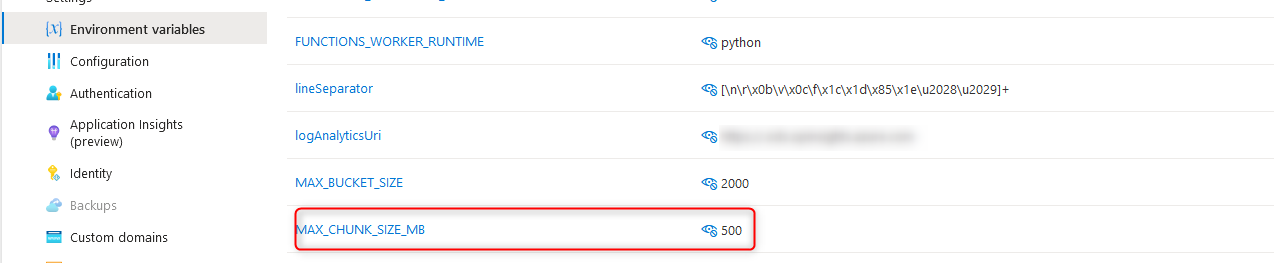
The variable I am talking about is “MAX_CHUNK_SIZE_MB”, which governs the maximum log file size for ingestion. If this value is not defined, it defaults to 1. The following behaviours may be observed if the maximum log size has defaulted to 1MB:
Errors in the function app log stream stating “Stream interrupted”. This occurs when the default maximum log size is reached. The message may seem to suggest the stream was interrupted from an external condition; however, the function app itself is responsible for terminating this stream.
Duplicate events within Sentinel. Reviewing the Cloudflare_CL table contents will reveal duplicate events. Duplicate events can be identified by the RayID value. Semi-unique RayIDs are assigned to each Cloudflare transaction, making RayID a useful way to identify duplicate events. If one or more log files are being interrupted during reading, the first portion of the log data will be ingested multiple times, resulting in duplicate log entries.
Log files greater than 1MB remaining in the storage account. When reading a log file is interrupted, the method to remove the file after completion does not get called. Consequently, the log file remains and is re-read on the next run – resulting in duplicate entries.
Resolving the issue side is achieved by simply creating a new environment variable on the function app called MAX_CHUNK_SIZE_MB and setting the value to a sufficiently large integer (in MB) to cover your log files.
I was helping a friend build some immutable backup storage recently, and we put some interesting FOSS tools to use. The results were great. This is not a plug for anything, just my observations.
MinIO: MinIO is an S3-compatible object storage system, with premium tiers available for enterprise users. Some of the key features useful to us were write-time encryption (using KES) for encrypted data at rest, bucket immutability and versioning (important), and simplicity of setup and maintenance. By placing the MinIO host on a dedicated network segment behind an OpenSense firewall, we can expose only the API to a single data ingest host that performs all the front-end work, like a heavy forwarder for backups. This keeps the backup data cozy and safe. The data storage and data ingest hosts can still be hardened to STIG or CIS benchmarks, of course!
Corso Backup: Corso Backup is a 365 backup client, with FOSS and premium editions available. Purely CLI-driven, this lightweight and easy-to-use tool backs up 365 data such as Exchange and SharePoint, with a variety of supported backup destinations (including self-hosted S3-compatible repositories). It has a small footprint on the data ingest host and has many of the nice-to-haves such as deduplication.
Slack Nebula: Nebula is a network overlay product that transmits TLS-encrypted TCP data over UDP, using a “lighthouse” server on the transit network for UDP hole punching to create persistent sessions through NAT gateways. Each client requires its own key and configuration file, and no automatic onboarding tools are provided by Slack (although they use this product for their internal network, and one must assume they have sophisticated tooling internally). However, the manual process is compensated for by how well and reliably it works, and the embedded YAML IP access list within the configuration file. By having pre- and post-backup scripts to establish and drop the Nebula tunnel, remote hosts can be backed up to the immutable S3 bucket via the intermediary ingest host, without requiring site-to-site VPN or any permanent connectivity. Employing well-defined access lists ensures only the minimum necessary surface area is exposed between hosts, for the minimum necessary interval, and not to public or transit networks.
While this isn’t archtiected to suit an organisation the size of HP, it is an excellent implementation for a small or lab environment, plus being fun for my friend and I to build something functional using FOSS tools while keeping in the spirit of least trust and secure by design.
When a friend of mine told me someone had registered a similar domain name to theirs, with a different suffix, and had been sending phishing emails with a forged signature to a variety of unrelated and unknown businesses, I was happy to help. After verifying there was no evidence of email or environment compromise, or internal data being spilled (just the letterhead), I look at the forged domain and emails.
One of the recipients was kind enough to send me a copy of the email, with headers. I was interested to note that the IP of the MUA sending the message was not present – the first MTA was the first IP in the list. So, I looked to the domain.
The registrar, domain privacy provider, and large org hosting the email all ignored my abuse complaints. I made a complaint with Netbeacon, who took the evidence I provided and sent it through the right channels. The domain was de-registered the following day.
Ping Castle has a free edition (requires installation and .net framework 3.5).
This tool will scan AD for a variety of security issues, including krbtgt password dated, admin accounts not in protected group / allowing delegation (reuse of krb ticket), control paths to permit unprivileged users to gain privileges (by hopping through groups/delegations), vulnerable schema classes, DES enablement on accounts, orphaned SIDs still in security groups, non-existent computers with active accounts… And the list goes on.
Highly recommended, and free for internal/personal use.
Enzoic Console Light runs on a local domain joined computer, to check AD for weak passwords, recycled passwords (eg. for domain user/domain admin pairs on the IT team) and passwords included in disclosed breaches.
The first 10 characters of the password hash is compared with the online database. Any matches are downloaded for local comparison, meaning the full password hash does not leave the network.
The free version will give a simple report when run, with paid versions running resident for continual checking.
Had a SOBR offload job that had files locked when a second offload job wanted to use the same files. Veeam suggested changing the offload job frequency using the reg key below:
By default the SOBR offload runs every 4 hours, please apply below registry key to change the offload frequency in Veeam backup server: Key: SOBRArchivingScanPeriod Type: REG_DWORD Value: 8 (in hours) — ensure to select decimal Path: HKLM\SOFTWARE\Veeam\Veeam Backup & Replication\ Description: The key is responsible for the interval of starting the SOBR Offload job.
Please restart the Veeam backup server machine afterward.
Also had an issue with a backup chain that was syncing files to/from the azure repo, one of which is 6TB. This large file caused a bunch of errors due to insufficient space in the system %temp% directory (c:\windows\temp\)
Solution is to set a custom temp directory (with sufficient space) on the backup server where the extents are connected (in this case, the backup proxy).
HKEY_LOCAL_MACHINE\SOFTWARE\Veeam\Veeam Backup and Replication\ Name: CustomTempDirPath Type: REG_SZ Value: should be system Variable for %Temp% by default.
This let me direct Veeam to a temp folder with sufficient space.
These are standard normal things I don’t have call to use often anymore, but have been useful in previous stages of my career.
Linking for my own reference in case of future need.
Some basic notes from the handouts, based on what I expect the questions to cover.
This is not an exhaustive transcription, just some dot points to help me memorise the things I will be quizzed on later.
1.
A service is a means of enabling value co-creation by facilitating outcomes that a customer wants to achieve, without the customer having to manage specific costs and risks.
A product is the configuration of an organisation’s resources designed to offer value for a customer. Utility is what a service does, and if it is fit for use. Warranty is how a service performs, and if it is fit for purpose.
A customer is a person who defines the requirements for a service, and takes responsibility for the outcomes of service consumption.
A user is an individual who uses a service.
The sponsor is the person who authorises a budget for service consumption. Servicemanagement is a set of organisational capabilities for enabling value to customers in the form of service.
2.
Cost is the amount of money spent on a specific activity of resource. Value is the perceived usefulness, benefits or importance of something. Organisation is a person or group of people that has its own functions and responsibilities, authorities and relationships to achieve its objectives. Output is the tangible or intangible delivery of an activity. Outcome is a result for a stakeholder, enabled by one or more outputs. Risk is a possible event that could cause harm or loss, or make it more difficult to achive objectives. It can also be describes as uncertainty of outcome. Risk can be added to or remove from the service consumer by the service.
3.
Service Offering is a formal description of one or more services, designed to address the needs of a target consumer group. A service offering may include goods, access to resources and service actions. Service relationships are established between two or more organisations to co-create value.
4.
Guiding principles are recommendations that guide an organisation in all circumstances, regardless of changes in goals, strategies, types of work or management structure. A guiding pricinple is universal and enduring. Focus on Value. All activities by the organisation should link back to value for itself, its customers and its stakeholders. Value may come in various forms such as revenue, customer loyalty and growth opportunities. Start where you are. It can be tempting to remove what has already been done to start over when considering an improvement, which can be a costly mistake. Do not start over without carefully considering what is currently available to be leveraged. Progress iteratively with feedback. Resist the temptation to do everything at once. Even the largest projects must be completed iteratively. By organising the work into smaller, more manageable sections that can be executed in a timely manner a sharper focus can be maintained. Collaborate and promote visibility. When initiatives involve the right people in the right roles, the effort benefits from increased buy-in, more relevance, better decision making, and increased likelihood of long-term success. Think and work holistically. Establishing a holistic approach to service management includes establishing an understanding of how all of the parts of an organisation work together in an integrated way. Keep it simple and practical. Always use the minimum number of steps required to achieve an objective. Outcome based thinking should be used to produce practical solutions that deliver valuable outcomes. Optimise and automate. Before a process is automated, it should be optimised to the greatest degree possible.
5.
Organisations and People. Staff, customers, users, suppliers, any other stakeholder in the service relationship. Everyone should understand their interfaces with others, their contribution, and have a focus on value. All parties should be developing their skills. Information and technology. The information that is created, managed and used in the course of service provision. The technologies in use depend on the nature of the service being provided – does the technology raise statutory or regulatory questions? Does the technology introduce risk? Will this technology continue to be viable in the future? Partners and suppliers. Encompasses relationships with other organisations that are involved in the development, supply, support of services or continual improvement. Also incorporates contracts or other agreements between the organisation and its partners or suppliers. Value streams and processes. Is concerned with how the various parts of an organisation work together to create value, in an integrated and coordinated way. This focuses on what activities an organisation undertakes and how they create value for stakeholders.
6.
The ITIL service value system. The SVS describes how all the components and activities of the organisation work together as a system to create value.
Key inputs to the SVS can be Opportunity and Demand.
The SVS contains: Guiding Principles, Governance, Service Value Chain, Practices, Continual Improvement.
7.
Service value chain. Interconnected elements support value streams, to facilitate response to demand facilitate value realisation through the creation and management of products and services.
Contains six SVC activities: Plain, Improve, Engage, Design and Transition, Obtain/Build, Deliver and Support.
8.
Plan. The value chain activity is to ensure a shared understanding of the vision, current status and improvement direction for all products and services across the organisation. Improve. The purpose of the import Value Chain Activity is the continual improvement of products, services and practices across all value chain activities and the four dimensions of service management. Engage. The purpose of this VCA is to ensure a good understanding of stakeholder transparency, with continual engagement and good relationships with all stakeholders. Design and Transition. To ensure products and services continually meet stakeholder expectations for quality, costs and time to market. Obtain and build. To ensure service components are available when and where they are needed, and meet agreed specifications. Deliver and support. To ensure products and services are delivered and supported according to agreed specifications and stakeholders specifications.
9.
Information Security Management. To protect information needed by the organisation to conduct its business. Relationship Management. To establish and maintian relationships between the organisation and its stakeholders at strategic and tactical levels. It includes the identification, analysis, monitoring and continual improvement of relationships with and between stakeholders. Supplier Management. To ensure the organisations suppliers and their performance are managed appropriately to ensure the seamless provision of quality products and services. IT Asset Management. To plan and control the lifecycle of IT assets to help the organisation control costs, maximise value and minimise risk. Monitoring and event management. To systematically observe services and service components and record configuration changes which are considered to be events. Release management. To make new and changed services and features available for use. Service configuration management. Collects and manages information about a wide variety of CIs, including software, hardware, network, people, suppliers and documentation. Deployment management. To move new or changed components to live environments; may also be involved in deploying components to testing or staging environments. Continual improvement. To align the organisations practices and services with changing business needs. Change control. To maximise the number of successful product and service changes by ensuring risk has been properly assessed, authorising changes to proceed and managing the change schedule. Incident management. To minimise the impact of negative incidents by restoring normal service operation as quickly as possible. Problem management. To reduce the likelihood of incidents by identifying actual and potential causes of incidents, and managing workarounds and known errors. Service request management. To support the agreed quality of a service by handling pre-defined user initiated requests in an effective and user-friendly manner. Service desk. To capture demand for incident resolution and service requests. Should also serve as the first point of contact for the service provider with all of its users. Service level management. To set clear business-based targets for service levels, and to ensure that delivery of services is properly assessed, monitored and managed against these targets.
10.
IT Asset. Any financially valuable component that can contribute to the delivery of an IT product or service. Event. A change of state that has significance for the management of a service or other Configuration Item. Configuration item. A component that needs to be managed in order to deliver an IT product or service. Change. The addition, removal or modification of anything that could have a direct or indirect effect on services. Incident. An unplanned interruption to a service, or reduction in the quality of services. Problem. A cause, or potential cause, of one or more incidents. Known error. A problem that has been analysed but not resolved.
11.
Continual Improvement. Encouraging improvement, securing time and budget for improvement, logging improvement opportunities, assessing and prioritising improvement opportunities, making business cases, planning and implementing, measuring and evaluating, coordinating improvement activities.
Plan, Improve, Engage, Design, Transition, Obtain/build, Deliver and Support.
Change Control. Standard change = pre approved.
Normal change = Goes through formal change approval process.
Emergency change = Can be actioned ASAP, needs to be approved.
Incident Management. Some incidents will be resolved by users, some using KB articles, some by the helpdesk, more complex incidents will be escalated for resolution.
Incidents can be escalated to suppliers, partners or vendors.
The most complex incidents may require a temporary team to resolve.
Problem Management. Problems are the causes of incidents. Require investigation and analysis.
Problem Identification, Problem Control, Error Control.
Trend analysis, recurring and duplicate issue identification, risk of recurrence, analysing information received from vendors, developers, etc.
Service Request Management. Delivery action request, information request, service or resource provision request, resource or service access request.
Should be standardised and automated. Should have policies for delivery and approval. User expectation management. Opportunities for improvement identified. Worflows to document redirecting of any requests.
Service desk. Phone calls, online chat, ticketing, emails.
Limited time window, or 24hr. Centralised or distributed team. Workflow system. Workforce management and resource planning. Knowledgebase. Remote access tools, dashboard and monitoring tools. Configuration management systems.
Service level management. End to end visibility. Shared view of services. Ensures org meets service levels through collection, analysis and reporting of metrics. Captures and reports on service issues.
SLAs – Must be related to a defined service in service catalog. Should relate to defined outcomes and not simply operational metrics. Should reflect an agreement.
SLAs – Data comes from – Customer engagement, customer feedback, operational metrics, business metrics.



 Adventures in a Binary Landscape