
When shipping Cloudflare logs to Sentinel and deploying the Cloudflare function app via VS Code, there is a particular environment variable that is important, but (at the time of writing) is not mentioned in the setup documentation.
The details for this variable can be found by reviewing main.py from the app package, or by performing an ARM template deployment from the Sentinel connector page and comparing. Note: the supplied ARM template deploys a consumption plan function app, which cannot be connected to a vnet, and therefore will not support the use of log analytics private endpoints, or permit network access control lists on the storage container.

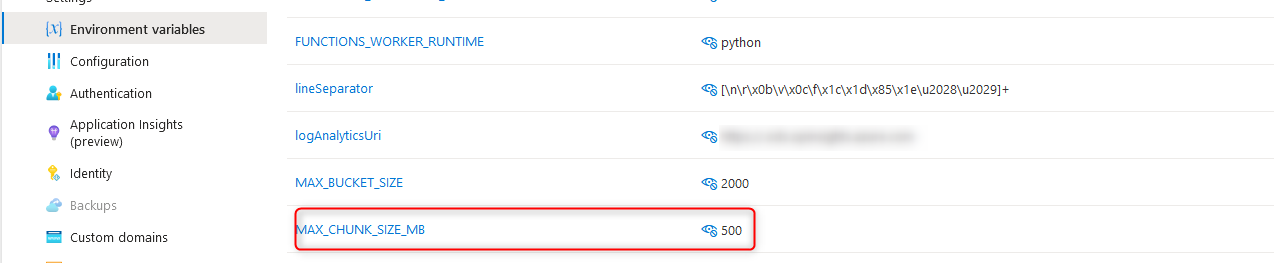
The variable I am talking about is “MAX_CHUNK_SIZE_MB”, which governs the maximum log file size for ingestion. If this value is not defined, it defaults to 1. The following behaviours may be observed if the maximum log size has defaulted to 1MB:
- Errors in the function app log stream stating “Stream interrupted”.
This occurs when the default maximum log size is reached. The message may seem to suggest the stream was interrupted from an external condition; however, the function app itself is responsible for terminating this stream. - Duplicate events within Sentinel.
Reviewing the Cloudflare_CL table contents will reveal duplicate events. Duplicate events can be identified by the RayID value. Semi-unique RayIDs are assigned to each Cloudflare transaction, making RayID a useful way to identify duplicate events. If one or more log files are being interrupted during reading, the first portion of the log data will be ingested multiple times, resulting in duplicate log entries. - Log files greater than 1MB remaining in the storage account.
When reading a log file is interrupted, the method to remove the file after completion does not get called. Consequently, the log file remains and is re-read on the next run – resulting in duplicate entries.
Resolving the issue side is achieved by simply creating a new environment variable on the function app called MAX_CHUNK_SIZE_MB and setting the value to a sufficiently large integer (in MB) to cover your log files.
 Adventures in a Binary Landscape