
Earlier this year I took an interest in some small-scale tinkering with local, open-weight LLMs.
I started small. Picking up an RTX 3060 12GB was inexpensive, and the small-form-factor card fit perfectly in my Intel NUC 9 Extreme. Twelve gigabytes seemed like a practical amount of VRAM to start with, and the card was easy to pass through over PCIe to a Proxmox guest VM on the NUC.
This was a good place to start, and it remains a useful helper node. It is my intention to run small helper models on this machine: RAG, reranking and visual models to support the Hermes agent. Things like that.
I did move on to building a custom LLM inference machine, though.
There were several compromises made in the name of cost. Computer hardware is expensive. The compromises were all considered and justified, though, and I am happy with the thought that went into them.
The objective wasn’t to build the fastest possible inference server at any cost. It was to get a large amount of usable VRAM, enough system memory, and a sensible number of PCIe lanes without paying workstation-platform prices.
What did I build?
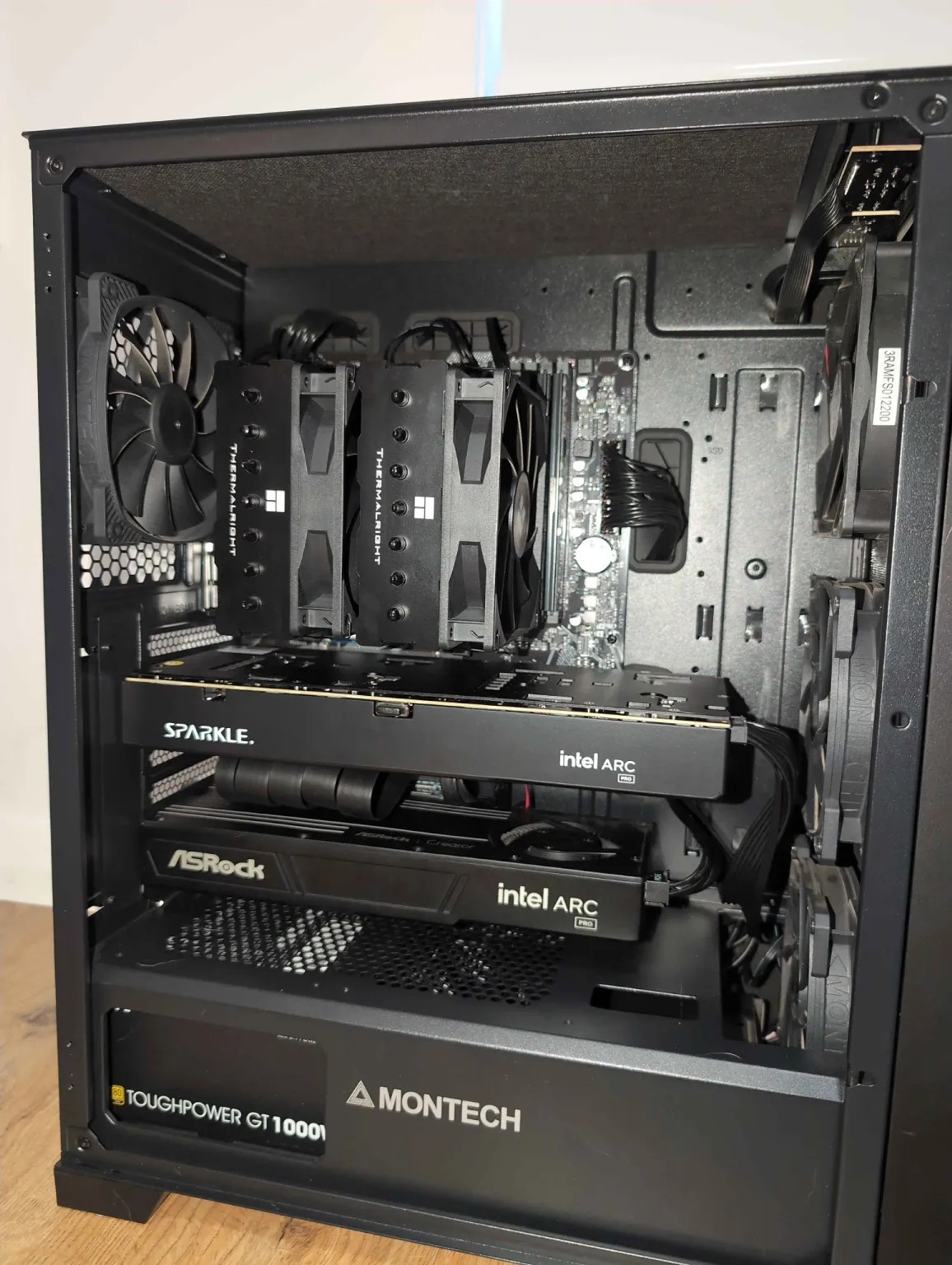
The machine is based around:
- Multiple system fans driven through a PWM replicator
- A Ryzen 9 5900X
- 64GB DDR4 RAM
- A 1TB NVMe disk
- A Gigabyte B550M DS3H AC R2 motherboard
- An Intel Arc Pro B60 Dual
- A standalone Intel Arc Pro B60
- 72GB of total GPU VRAM
- A 1000W power supply
- A Thermalright Phantom Spirit CPU cooler
The CPU and RAM were bought through Facebook Marketplace. The video cards were bought new.
That was deliberate. CPUs and RAM are fairly safe second-hand purchases if they can be tested. GPUs are more expensive, mechanically more complicated, and a much more lucrative target for scammers palming off defective kit. With the video cards being the centre of the build, I was happier buying them new.

Ryzen 9 5900X
I found a Ryzen 9 5900X on Facebook Marketplace at a good price.
This is one of the top CPUs available for the AM4 platform, and I think it was a good investment. It gives me 12 cores and 24 threads without requiring a move to a newer and more expensive motherboard and memory platform.
It is more than capable of looking after the host operating system, containers, model loading and the orchestration around the GPUs. It also gives me some room for CPU offload when needed, although avoiding CPU offload is obviously preferable for inference performance.
The AM4 platform is old enough to be affordable, but not so old that it is a problem. That distinction mattered throughout this build.
64GB RAM
I installed 64GB of DDR4 RAM. I would prefer to have more, but RAM is far too expensive for that at the moment.
The 5900X drives all four RAM slots at 3200MHz without the all-slots-full-slow-down-memory-clock that some CPUs deliver. So that’s winning.
More system memory would allow more model weights to remain cached and make CPU-offloaded models a little easier to manage. However, I would rather spend the available budget on VRAM. For the workloads I am targeting, GPU memory is the scarcer and more immediately useful resource.
Sixty-four gigabytes is enough for the operating system, inference services, model loading and the supporting tools around them. It is a compromise, but a sensible one.
1TB NVMe storage
The machine has a 1TB NVMe disk. This sits in the CPU-connected NVMe slot.
Model files become large very quickly, particularly when testing several quantisations of the same model. One terabyte is not unlimited, but it is enough to keep a practical collection of models locally without spending heavily on storage at the beginning of the build.
Using the CPU-connected slot also keeps the main disk away from the chipset link being used by the third GPU. That matters because the second full-length PCIe slot is already one of the key compromises in the machine.
The B550M motherboard trade-off
The motherboard is a Gigabyte B550M DS3H AC R2.
It has one PCIe Gen 4 slot with 16 lanes connected directly to the CPU. The second full-length slot is PCIe Gen 3 x4 and connected through the chipset.
Seems a bit old, no?
It is; but this is one of the key trade-offs I made.
A workstation platform with more direct CPU lanes would be cleaner. It would also be much more expensive once the motherboard, CPU and memory were included. I didn’t need every GPU to have a full x16 connection. I needed a lane arrangement that could accommodate three GPUs without ruining the economics of the build.
The primary slot supports x8/x8 bifurcation. That means the 16 CPU-connected lanes can be split into two eight-lane links. This allows me to run the Intel Arc Pro B60 Dual, which is effectively two Arc Pro B60 GPUs on one board. Each GPU receives eight PCIe lanes and provides 24GB of VRAM.
The second slot accommodates a standalone B60. It is limited to PCIe Gen 3 x4 through the chipset, but that does not make it useless.
Far from it.
Why PCIe Gen 3 x4 is enough here
The standalone B60 does not have the bandwidth needed to make tensor parallelism attractive. Tensor parallelism requires the cards to exchange data frequently while jointly processing the same layers. Fast communication between GPUs matters a lot in that situation.
That isn’t the only way to use multiple GPUs, though.
With pipeline parallelism, the model can be divided into groups of layers and placed across the GPUs. The activations passed from one stage to the next are tiny compared with the bandwidth available from even a PCIe Gen 3 x4 interface. Loading the model onto the card will be slower, but once it is resident in VRAM, the link is still useful.
This layout is indeed useful for running 70B models of 50GB+ sized weights entirely in VRAM. There is some overhead involved in orchestrating the sharded weights and moving tokens between cards – but it does work quite acceptably.
For multi-agent workloads, or offline-batched workloads, all three cards are expected to be utilised at a given time. This maximises the use of resources and achievable performance.
The chipset slot is a compromise. It is also the slot that lets an inexpensive consumer motherboard host the third accelerator. I am happy with that exchange.
Three Intel Arc Pro B60 GPUs: 72GB VRAM
The GPU configuration consists of an Intel Arc Pro B60 Dual and a standalone Intel Arc Pro B60.
The Dual card contains two B60 GPUs, each with 24GB of VRAM. The standalone card adds another 24GB. That gives the machine three Arc Pro B60 GPUs and 72GB of total VRAM.
That’s plenty for quantised 27B to 70B models with loads of context.
The cards were attractive because they offer a large amount of new VRAM at a much lower price than traditional datacentre accelerators. They are not a perfect replacement for NVIDIA hardware. Software support and backend maturity still matter, and the build uses Vulkan-based inference rather than relying on CUDA.
But 72GB creates options.
A model that fits on a single card can run there without being split. A larger model can be distributed across the cards. Separate agents can be given their own models and GPU affinity. Helper models can be kept apart from the primary reasoning model. The system can favour interactive speed for one job and capacity for another.
My testing has already shown that more cards do not automatically mean more tokens per second. A model that fits entirely on one card can be faster there than when it is split across two or three cards. Sharding introduces overhead, and the GPUs don’t magically behave like one enormous accelerator.
That is fine. The purpose of the three-card configuration is not linear scaling in every workload. The purpose is capacity and flexibility.
Cooling three GPUs without a workstation chassis
Cooling needed some consideration. This is a multi-GPU inference machine built from consumer components, and the motherboard does not provide an endless collection of fan headers.
The case uses three 120mm intake fans, with two directing air toward the GPUs, and a 120mm exhaust. The Ryzen 9 is cooled by a Thermalright Phantom Spirit.
I used a PWM replicator to drive the multiple system fans. The replicator is powered separately, so the current required by all those fans is not being pulled through one motherboard header. It takes the PWM control signal from the motherboard and applies it across the connected fans.
That gives me one coordinated, temperature-responsive fan arrangement without overloading the board or adjusting several fans individually. It is a small and inexpensive part, but it makes the cooling design much cleaner.
The two B60 designs also behave differently. The blower-style Dual card remains comparatively cool, while the standalone card runs warmer and waits longer before increasing its fan speed. Both have remained within reasonable temperatures, but the difference reinforces the need for airflow across the whole system rather than assuming each GPU cooler will handle everything by itself.
Was the cheap motherboard worth it?
Yes.
There have been complications. Above 4G Decoding and Resizable BAR matter. PCIe bifurcation has to work correctly. Risers, cable orientation, device enumeration, IOMMU behaviour and the interaction between PCIe devices and NVMe storage have all needed attention.
This was never going to be as simple as installing one gaming GPU and loading a driver.
But the alternative would have been paying workstation prices to avoid compromises that don’t seriously affect my intended workloads. The Ryzen 9 5900X, B550M board and DDR4 memory give me a cost-effective host. Bifurcation gives both GPUs on the Dual card eight CPU-connected lanes. The chipset slot gives the third card four more lanes. Pipeline parallelism and independent agent workloads make that topology useful.
The CPU and RAM came from Facebook Marketplace. The GPUs came new, with warranty. A PWM replicator made several case fans manageable. Every choice either saved money, increased usable VRAM, or made the resulting machine practical to operate.
Power consumption?
The intel cards idle somewhat high – around 30w each. So, at around 100w power draw at idle, it does cost a dollar a day just to exist. Or so. That’s before use. I would prefer the cards to power down more, but I have not enabled PCIE power saving and don’t plan to.
 Adventures in a Binary Landscape